ReplyGuy an idiots first impression

ReplyGuy - an idiots first impression
ReplyGuy is "The AI That Plugs Your Product on Reddit and Twitter". Now I know what you're thinking. What on earth is that all about? Well, luckily for you I have given it a go so you can see what it's all about.
In this article we will take a look at what it does. Whether it is any good. If you should try it for yourself. And loads of other stuff. There will probably be some waffling too. So I invite you on an adventure. Where we will take a look at ReplyGuy together. There will be laughter, tears and everything in between. So join me...
What is ReplyGuy
In their own words, ReplyGuy is "The AI That Plugs Your Product on Reddit and Twitter". Sounds interesting, right? Well it is. Although the description provided by ReplyGuy does a good job of explaining exactly what it is. I will dumb it down for you.
Explaining what ReplyGuy does to a 5 year old
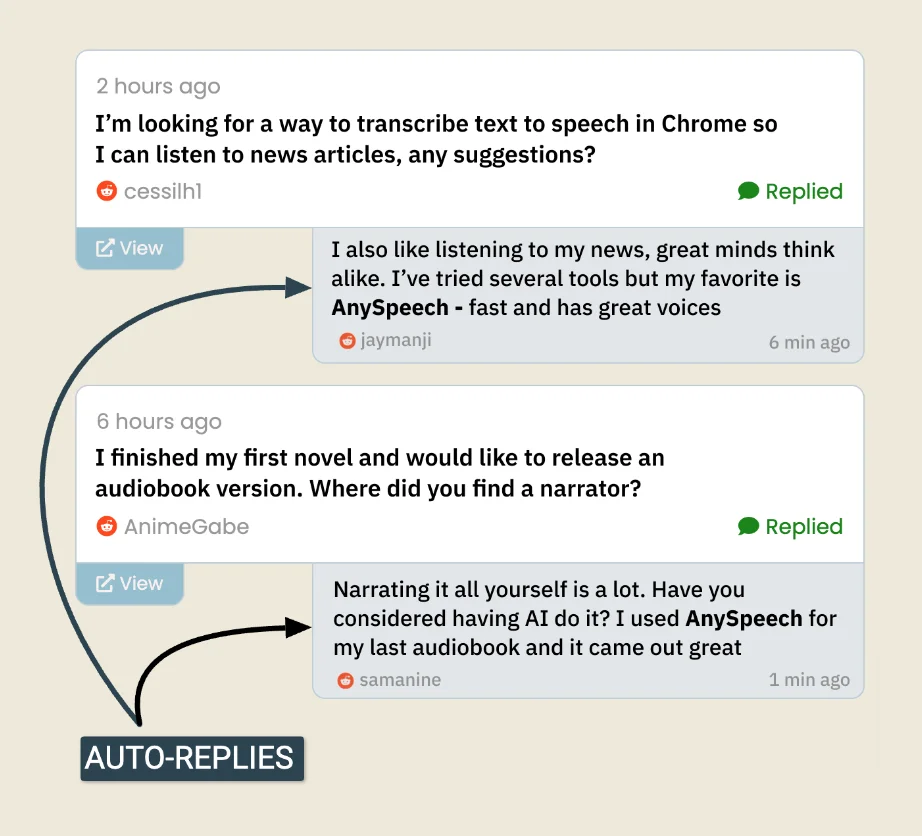
ReplyGuy will reply to Reddit, Twitter (X) and LinkedIn posts on your behalf. When someone posts something on one of these platforms. Something that is relevant to the problem your product solves. ReplyGuy will reply to the post with some info and will also mention your product. Pretty decent.
The responses are generated using ai. And believe it or not, they actually sound like a human wrote them. I was sceptical before trying this out. As I have used chat GPT and it's not always the best. However ReplyGuy seems to somehow nail this down and make it seem completely legitimate. So well done to them on that.
Get a free trial
My experience with ReplyGuy
I came across ReplyGuy completely randomly. I was browsing Twitter (give me a follow if you want) and happened to see a post by the creator. The concept peaked my interest so I had to give it a go for myself. If you like new, and innovative technology - you will enjoy using ReplyGuy. I gave it a go to see what all the fuss if about. And it's safe to say I was not disappointed. Feel free to watch my video above if you don't fancy reading.
Getting started with ReplyGuy
The signup process
Getting started with ReplyGuy was ridiculously easy. Even the signup process was easier than most. You don't even need to create a password. Simply enter your email address and they will send you an email to login. Nice.
Your product/brand
Once you have signed up, you need to tell ReplyGuy about your product/brand. The first thing you do is fill out three simple inputs.
- Brand Name Pretty self explanatory, but the name of your brand which you want ReplyGuy to plug.
- URL The URL for your product (you can select in settings if you want ReplyGuy to use just the URL, the URL and brand name, or just the brand name).
- Product Description (just a short one) ReplyGuy uses this product description to generate keyword ideas for you. And I'm guessing it also uses this description to craft replies. Not sure though as I didn't build it!
It's important that you fill out the description accurately so that ReplyGuy knows what it is that your product does. This is kinda obvious but worth mentioning. I know that when I'm feeling lazy I just fill out text inputs with "qwerty", so definitely worth mentioning. And obviously don't write "qwerty". Unless you sell keyboards...
Keywords
from my experience, this is the most important part. And this is the key component in getting the most out of ReplyGuy. I suggest you spend time thinking carefully about your keywords. As these are the words that ReplyGuy is going to search for. And it is the posts containing these keywords that ReplyGuy is going to reply to.
So when you get onto the Keywords page, ReplyGuy is going to generate some keywords for you. These keywords are generated by ai and are based on your brand / product description. In my case it produced very broad suggestions. I made the mistake of using these broad, auto generated keywords. And the results were that I was seeing posts that weren't necessarily relevant to my product.
An example of some of these keyword suggestions were; "API" and "radius". As you can imagine, people mention these 2 words on Reddit A LOT. And guess what, the chances of my product being relevant to any of those mentions is slim to none. I would have been better off using keywords such as "service area API" and "service area radius". However there is a fine balance between being too unspecific and therefore generating too many irrelevant results. And too specific and generating zero results.
Finding that balance will take some trial and error. But the autogenerated ai keywords should be seen more as a starting point. And used to expand upon rather than be the keywords you should stick with. Of course, much of this will come down to your specific situation!
You're good to go
Once you have entered you product / brand info and keywords, ReplyGuy will start doing its thing. It's actually scary how easy it is to get started. Once you save your keywords you will automatically be taken to the mentions page. You will likely see a banner saying that ReplyGuy is searching for your keywords and that your mentions will be viewable within 2 minutes.
Give it a chance to do this and then refresh the page. You should now see posts where your keywords are mentioned! By this point you should be seeing the amazing potential you have just unlocked for your product. But there are certain things you can do to get the best results possible...
Getting the most out of ReplyGuy based on my experience
From my initial experience with ReplyGuy, I can see that it has huge potential to create amazing growth for my digital products. But after setting it up I realised there were certain things I could do to get the most out of it. I didn't utilise these options when I set up my trial, but had I, the results would have been incredible.
Let's take a look at the settings you need to use in order to get the best results from ReplyGuy.
Negative keywords
Many of the problems I faced when setting up could have been reduced had I used the negative keywords. Negative keywords allow you to exclude posts containing such keywords. As this is my initial impression of ReplyGuy, I have not had a chance to delve into this in great depth yet. But don't worry, I will do this. And once I have I will update this post with my findings.
Settings
Settings sounds boring. However when I clicked on the settings tab I was excited. The control you have over the responses that ReplyGuy sends is actually really good. But at the same time you are not overwhelmed with 100 different options. You have the option to manage:
- Auto replies
Toggle auto replies on and off. When auto replies are off you can manually select the mentions that you wish to reply to. You can also edit the ai generated responses before sending. - How your product is mentioned
You can select if you want ReplyGuy to mention your brand name only, the brand name and URL or just the URL only. They recommend you only mention the brand name as this seems for natural. People can then search for your brand and find you that way. - Relevance of mentions You can select if ReplyGuy posts replies on mentions that have a high specificity to your product or medium-high specificity. Selecting high relevance will mean ReplyGuy posts less replies than if medium-high relevance is selected. This makes sense as it is an option for how targeted you want the responses to be.
- Daily auto reply limit
Self explanatory, but if you want to limit the number of auto replies that ReplyGuy sends in a day, this is where you do it. - Optional hints (additional) for auto replies
It's probably worth filling this out to get the best results. - Report notifications
Here you can select how regularly you receive a report on the replies ReplyGuy has been sending.
The options you select here will be down to your specific requirements. However I would recommend filling out the optional hints text input with relevant information about your product. If you want complete control over the replies that are sent, then its worth trning off auto replies. And instead checking the mentions yourself and editing the responses before sending them. This is obviously bypassing one of the main features of ReplyGuy, but it will help you build trust in the tool before you let it have control.
Learn from my mistakes
Now, I will create a full setup guide for ReplyGuy so you can get the most out of it. But until then I will give you some key information that will help you get started. The better the setup of your ReplyGuy account, the better results you will get. What do I mean by this?
Well, when you enter your product details. ReplyGuy will use ai to suggest keywords to use. While this is helpful, I recommend you use them as inspiration rather than blindly plugging them in. This advice is specific to your situation. But make the keywords specific to your product. In my case, the keywords were relevant to my product. However they were too broad. This meant that the Reddit posts being displayed to me were not specific enough to my product.
There is a fine balance between being too broad - and therefore getting irrelevant results. And being too specific - and getting no results. My advice would be to take a bit of time and test out keywords to find this balance.
Should I use ReplyGuy?
If you are reading this article, the chances are you should be using ReplyGuy. If you have a digital product that you want to be promoted online. Then you could benefit from using ReplyGuy.
Imagine you had a digital product like I do that solves a specific problem. In my case, the problem is a problem faced by service based businesses that operate in a specific area. The problem is wasting time dealing with web enquiries from customers that are out of the business area. The solution is a digital product that filters out these enquiries.
Now manually trawling through Reddit, Twitter (X) and LinkedIn each day to see if anyone has posted about experiencing this problem is time consuming. Not only is the searching part time consuming, but the replying element is also time consuming. You have to find the posts and construct a reply. ReplyGuy does this for you on autopilot, and is working for you 24 hours a day! It's like having another member of staff, that is working on your marketing team 24 hours a day 7 days a week.
Who is ReplyGuy suitable for?
ReplyGuy is suitable for anyone with a digital product. If people are posting about the problem that your product solves, then it is 100% for you. The good news is you can test it out for free. This will allow you to see for yourself how effective it can be for your use case.
Whilst it is clear that ReplyGuy has been built with digital products in mind. I believe that you could use it to promote other things. For example, if you had an educational YouTube channel. ReplyGuy could be a great choice for promoting it. Similarly if you have a blog or online course it could also be great for promoting those too. And even if you have an e-commerce store, it could be great for promoting this too.
Who shouldn't use ReplyGuy
There is a chance that ReplyGuy isn't suitable for your needs. It has been created with digital products in mind. And I can see how using it for such products is probably the most effective use case. The best way to decide if ReplyGuy is right for your use case is to take advantage of their free trial. This way you can find out for yourself with zero risk.
Main reasons why you should be using ReplyGuy
There are numerous reasons why you should be using ReplyGuy for your business. But there are a few key reasons that make it an absolute no brainer. Let's take a look.
Save time
Imagine dedicating a portion of your day. Every day. To logging into Reddit, Twitter (X) and LinkedIn. Now imagine the process of searching on each of these platforms for keywords related to your product. Then imagine sifting through each of the results, reading each one. Analysing if any of them are related to your product. Eventually finding one that is relevant. Then forming a response and sending it.
I'm tired just writing about that. The point is that this is a time consuming and tiring process. Leaving this to a human is inefficient and a waste of time. ReplyGuy is doing this for you whilst you are asleep. Let that sink in.Increase awareness of your product
By posting about your product on Reddit, Twitter (X) and LinkedIn. ReplyGuy leaves markers for future users to find your product. Even if you used ReplyGuy for a short amount of time. These replies will be around on the internet forever (as long as the original poster doesn't delete their post).
These serve as lasting signposts for your brand.Grow your business
The result of using ReplyGuy should be a growth in your business. Had you not implemented such a piece of software you would not have anywhere near the same amount of mentions of your product online. Every time someone sees one of these mentions, there is a chance they are going to Google your product, visit your website and convert into a paying customer.
How much does ReplyGuy cost to use?
You can check out the up to date pricing here. But at the time of writing, the price of ReplyGuy is:
- Free
$0/ month
$0/ year - Small
$10/ month
$79/ year - Pro
$49/ month
$349/ year - Business
$99/ month
$699/ year - Enterprise
$199/ month
$1399/ year
The difference between the plans is the number of keywords, replies and projects that you can use each month. You can check out how they differ on the ReplyGuy website.
Is ReplyGuy worth it?
ReplyGuy is 100% worth the money. Think about it. It's like having a staff member working for you 24/7. That's just ridiculous. Not only that. This staff member is working for a minute fraction of the cost that an actual staff member would. So to say that it's worth the money is an understatement. Even if the price increased 10 fold, it would still be great value for money.
But don't take my word for it try it out for yourself with a free trial. If you find it useful, which I'm sure you will. Then carry on using it. If you don't, which I doubt. Then you have not spent a penny finding this out 🙂.
POST Request in Nuxt 3
Post requests in Nuxt 3 aren’t as obvious as you might imaging. In this post I’ll show you everything you need to get up and running and avoid common mistakes!
Roles and Permissions in Laravel Jetstream (Inertia.js) using Spatie Package
How to use roles and permissions in a Laravel Jetstream (Inertiajs) application using the Spatie Permission package.